The
reason for changing font sizes is a simple one - the page was designed
for font sizes of 10 points and often, if the browser's font settings are
too large, things won't line up. Annoying to the viewer and, invariably,
the site gets blamed. Most people's browsers default their
variable
width fonts to 12 points and their fixed width fonts to 10 points.
To view this website at it's optimum level, that is to say, as the designer
intended it to be viewed, then your variable width font size needs to be
changed to
ARIAL
- 10 point and your fixed width to COURIER NEW - 10 point.
Here's how :
1)
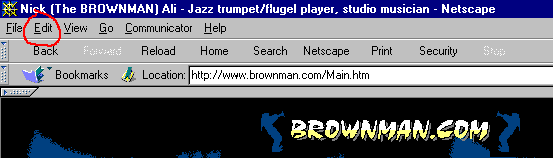
Find the EDIT button on your menu bar.
2)
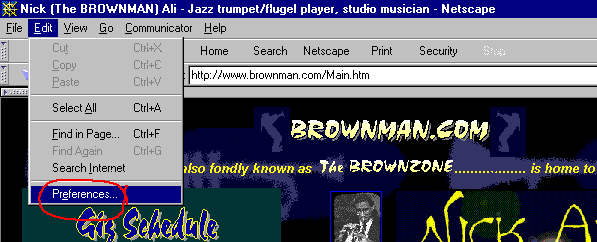
Clicking once on the EDIT button will drop down the edit-menu. Click
once on the PREFERENCES button.
3)
Clicking once on the PREFERENCES button will open up the preferences dialog
box shown below.
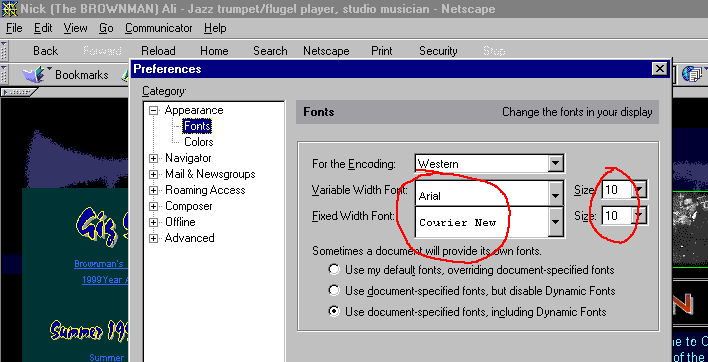
You want to change the Variable Width Font to ARIAL and it's font size
to 10.
Then change the Fixed Width Font to COURIER NEW and it's font's size to
10.
Now you're set to view BROWNMAN.COM as it was intended to be seen! It makes a difference in pages like the Gig Schedule where dates and times often don't line up if your browsers font sizes are set too large. Enjoy!
And now - on to the site - click below to enter:
